
Because the CMS saves every entry automatically, we have found that lots of unnecessary pages are being created but left unused, and are not always easy to find to delete.
This tool:
-
is to help with housekeeping.
-
helps identify pages that are not included in the site navigation, and are therefore not published on the website.
-
helps identify pages that are not in the site navigation, but have a published status (these pages are historical leftovers from the site migration and should not be live).
-
currently shows pages of all statuses including draft pages, although we plan to make it optional that these are automatically displayed in search results.
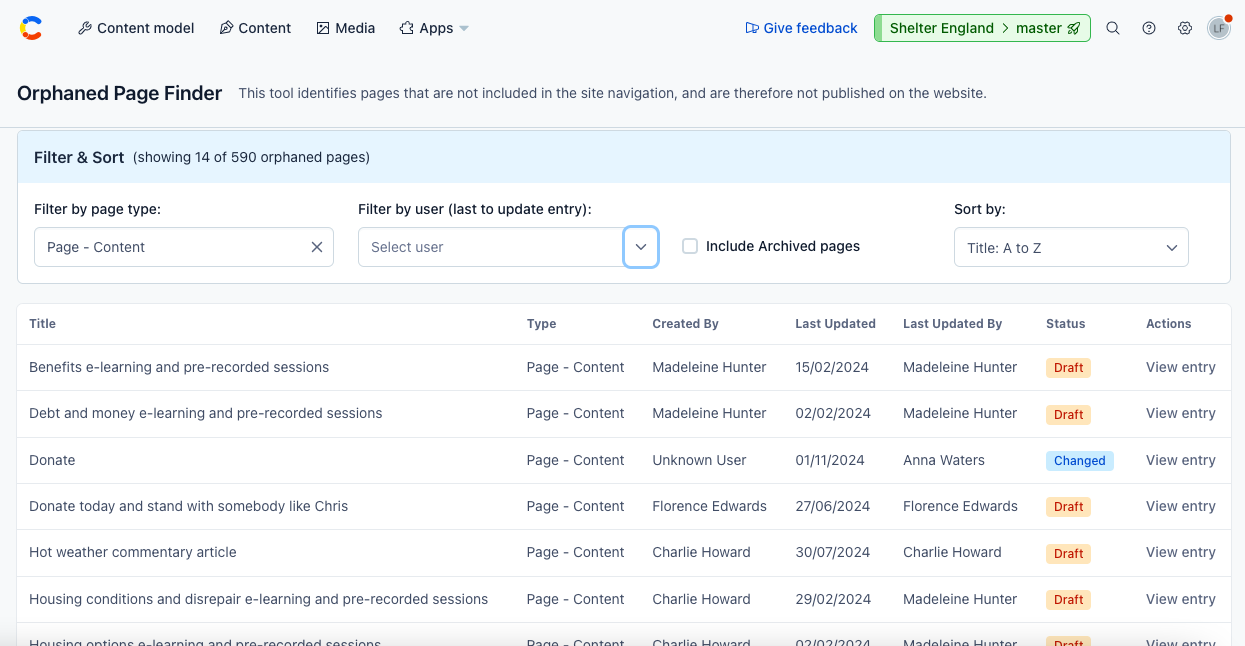
How to find orphaned pages
-
Open the ‘Orphaned page finder’ app in the dropdown under ‘Apps’ in Contentful’s top navigation bar.
-
First, choose the type of page you want to find from the ‘Content type’ dropdown.
-
You can filter by user if you wish to using the ‘Created by’ dropdown or display all results by leaving this field empty.
-
Tick the ‘Include archived pages’ checkbox if you wish for these to be included.
-
Results will be displayed automatically and you can use the ‘Sort by’ menu to change how the results are displayed according to need.